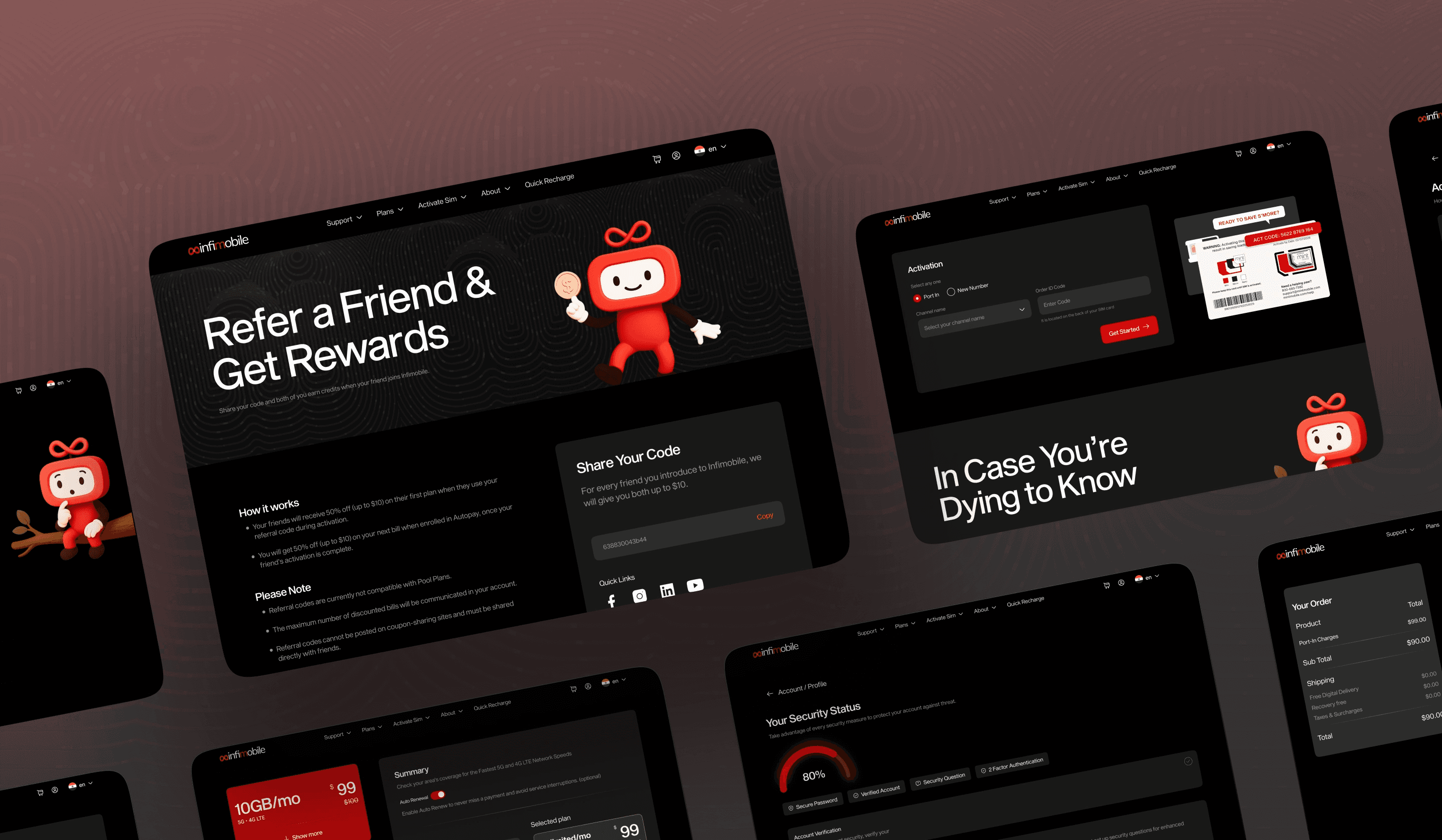
A Data-Driven UX Redesign & Bold Visual Overhaul
Website & App Redesign | Dashboard Redesign | Lead UX Designer

MY ROLE
TEAM
DOMAIN
Telecom / MVNO
TIMELINE
OVERVIEW
Infimobile is a prepaid telecom provider running on premium US networks, with affordable plans, 25,000+ subscribers, and growing faster than they'd projected. The product had real value. The problem was that the digital experience made it really hard to see that.
Telecom is dense. Users are juggling plan comparisons, coverage checks, SIM activation, and account management, sometimes all in the same session. That complexity isn't going away, and it shouldn't. My job was to make it feel manageable, not invisible.
Infimobile's existing site and app weren't broken, but they were frustrating, and that frustration was quietly killing both conversion and retention.
Website: https://infimobile.com/
Core Design Question
Focused on how users think, feel, decide, and progress, not how things look
UX Audit: Taking Inventory
Before designing anything, I went through the entire site, every page, every flow, every click path. Just to understand what was actually there and how it all fit together.
So that's where I started. Using Usability Heuristics as a lens,
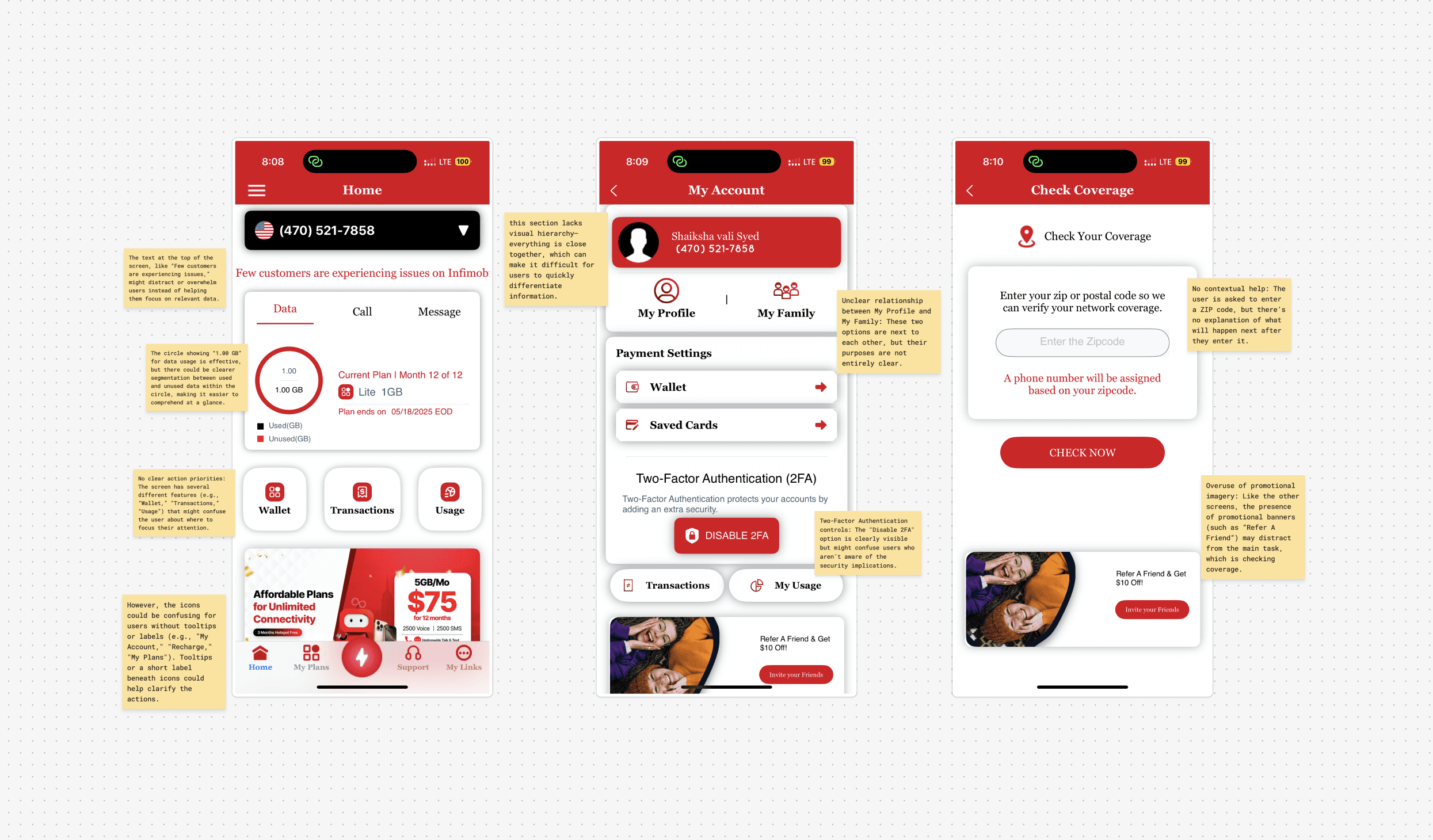
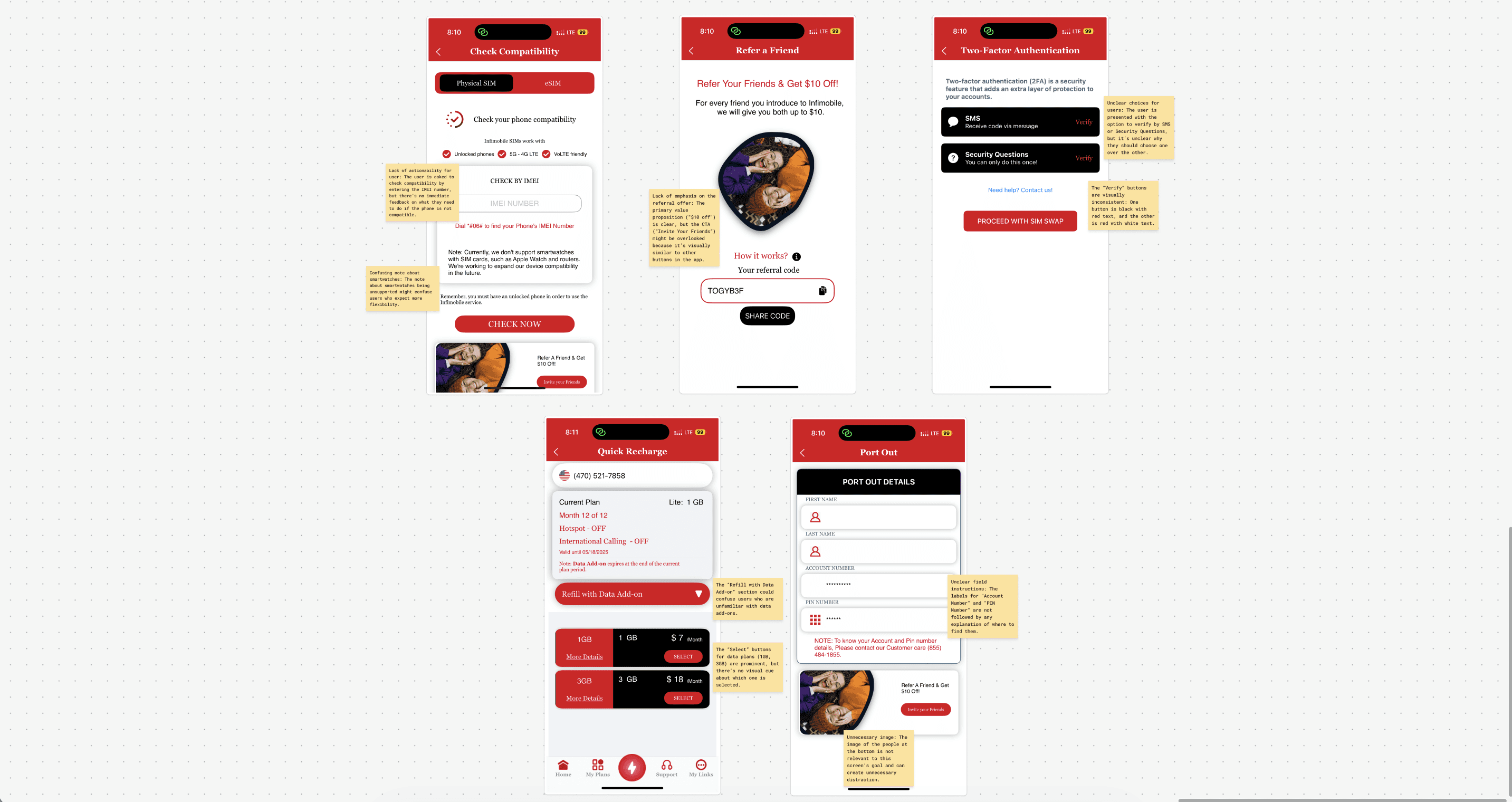
Strategic UX Insights:
Navigation Overload:
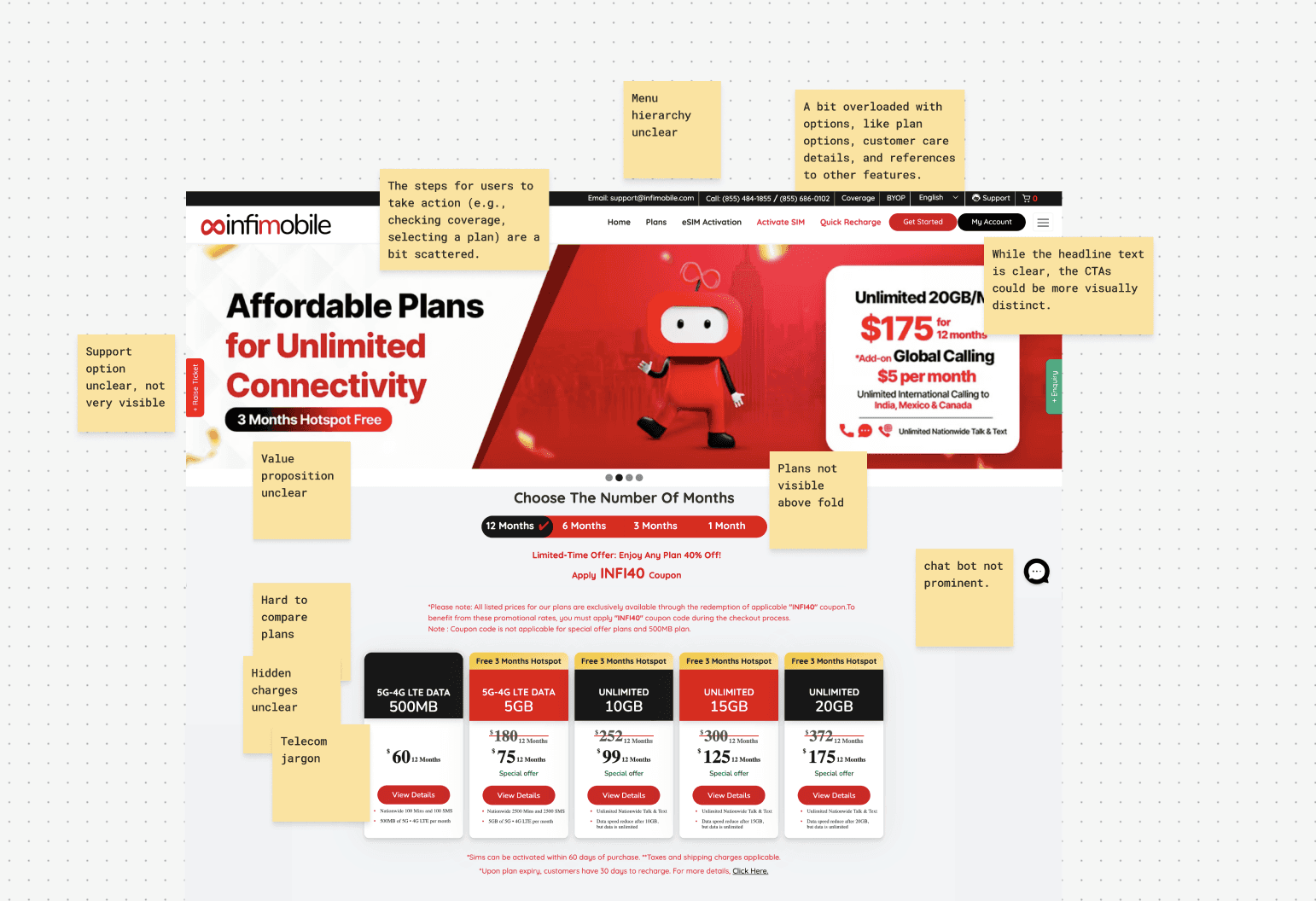
Too many options in the navigation, nine items at the top level, no clear order. And things like 'Coverage', 'Check my area', and 'Network' were three separate links, all going to basically the same place. Users had no idea where to go.
Invisible Self-Serve Features:
Useful features were hidden, things like pausing your plan, porting your number, downloading an invoice, these features existed, but they were buried so deep that nobody found them. So users called support instead. Which cost the business time and money.
Context-Blind Promotions:
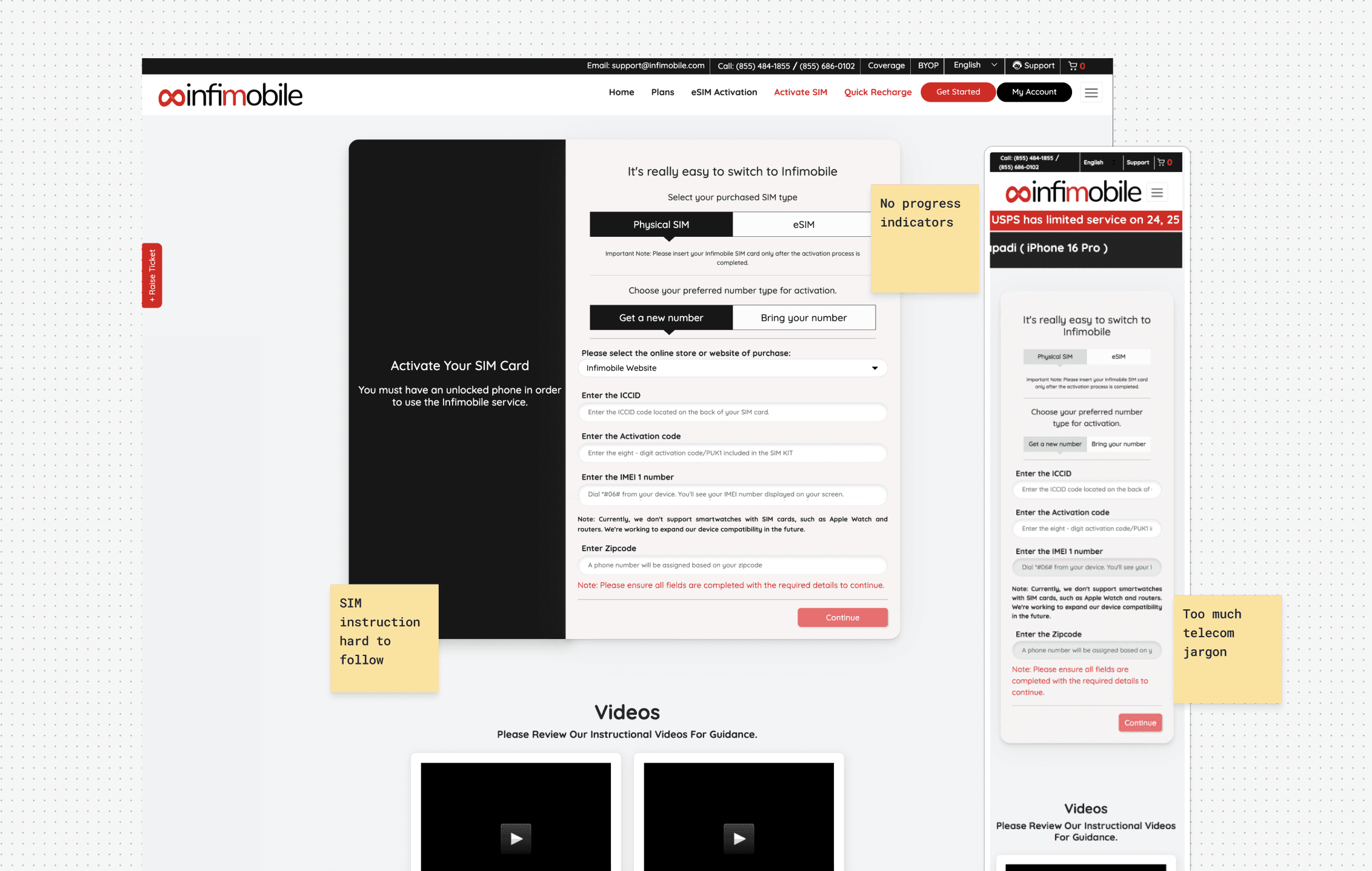
Pop-ups at the wrong moment, promotional banners were showing up right in the middle of important tasks, like while you're activating your SIM. That's exactly when you don't want to be distracted.
Plan Comparison Paralysis:
The plans page was overwhelming, every plan looked the same. The language was full of technical terms like 'MVNO' and 'LTE Band 12'. There was no 'recommended' option. Users just didn't know what to pick.
Usability Testing, Confronting Reality
Building our user tests
The audit showed me where things were broken. Usability testing showed me how it felt to be on the other side of that. I needed real people to tell me which pain points were frustrating versus which ones made them quit altogether.
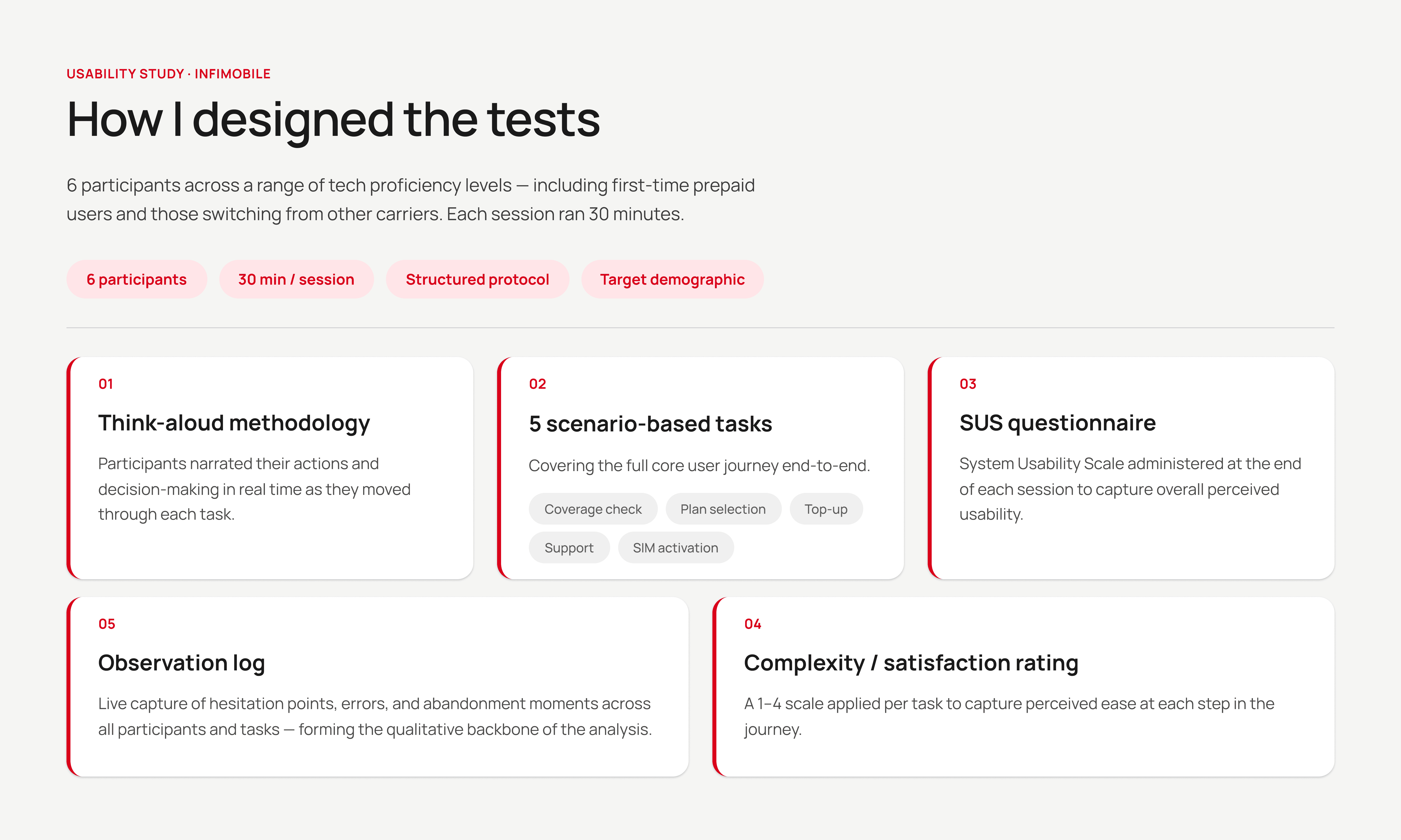
The tests, and the (poor) results
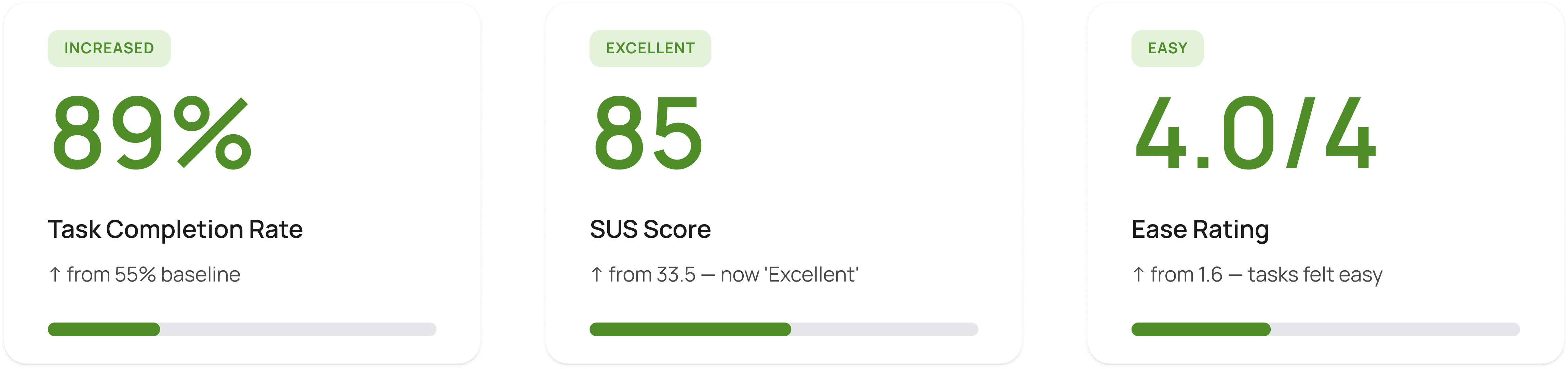
All 6 participants, recruited to reflect Infimobile's core user segments (new-to-MVNO and plan-switching users), went through the same 30-minute moderated usability test, completing specific tasks across the site. Given our timeline and access constraints, 6 was a deliberate choice: enough to surface recurring patterns with high confidence, while the SUS scores gave us a quantitative baseline to measure against post-redesign. The results were below average across the board, and it showed we had our work cut out for us.
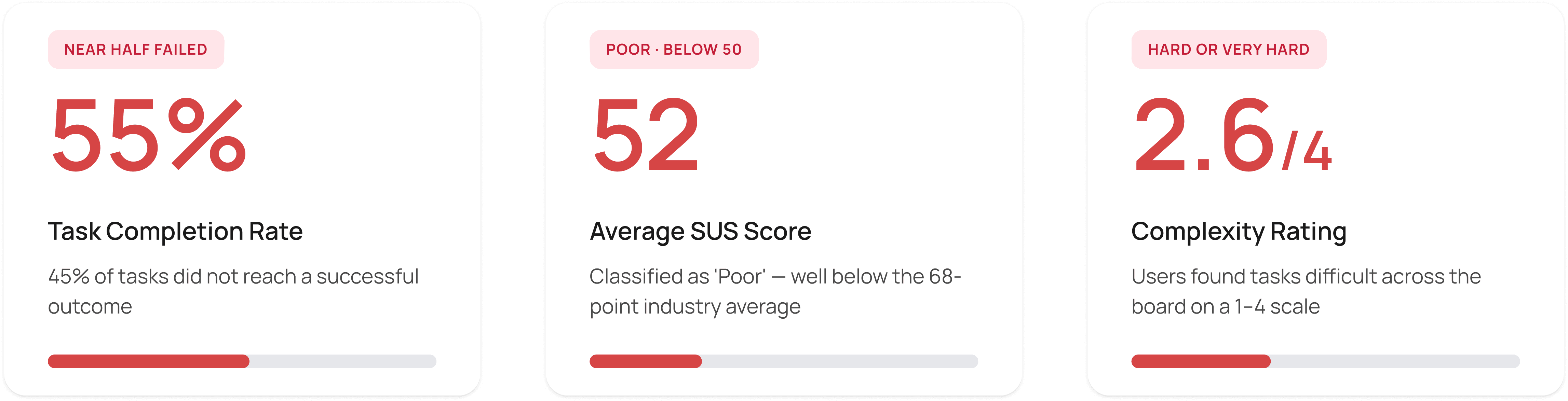
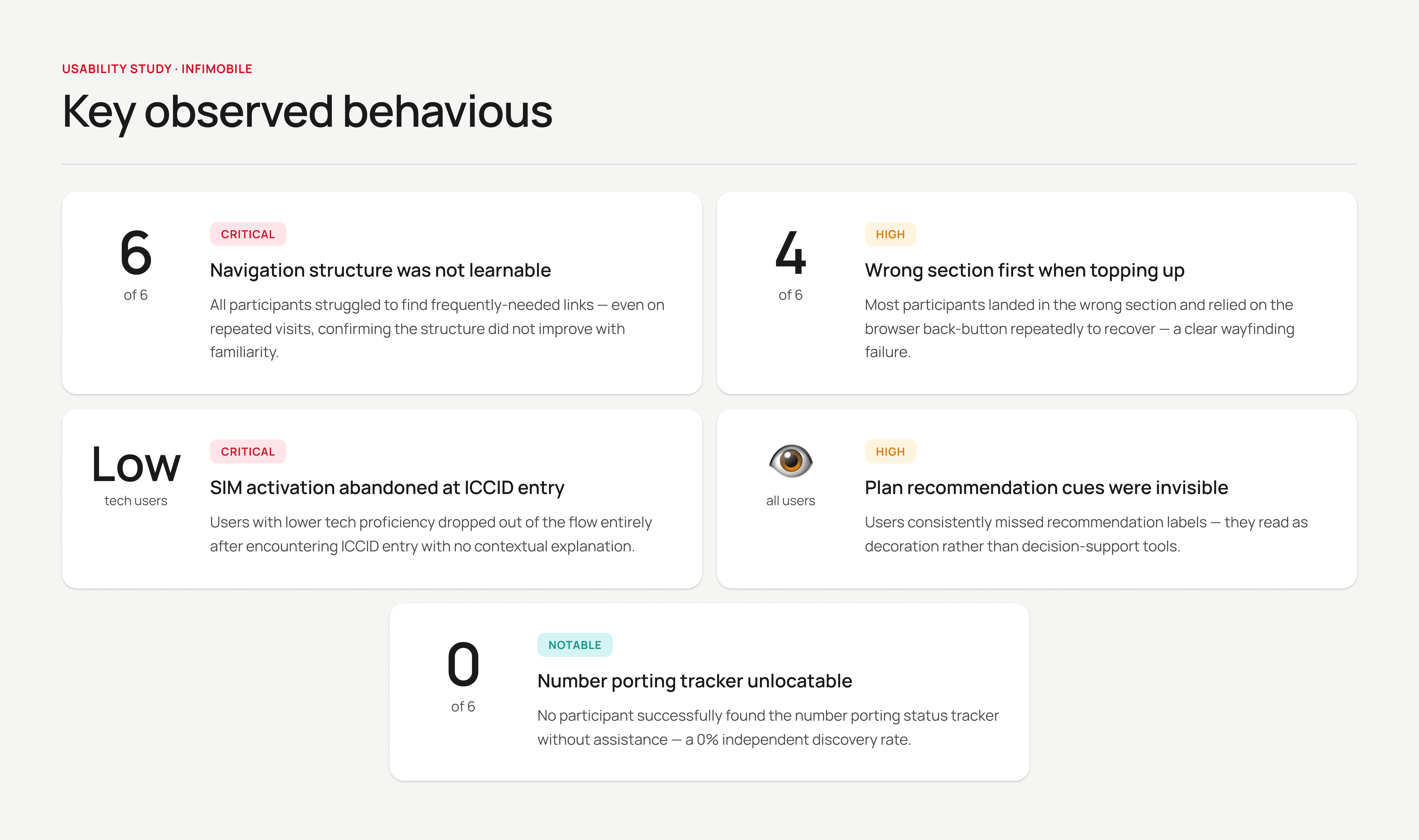
Testing Outcome
Every participant encountered friction in the same places; navigation, plan comparison, and SIM activation with almost no variance across sessions. We ran affinity mapping on session notes and think-aloud observations to cluster pain points, which gave us a clear, evidence-backed priority stack rather than a gut-feel list. These three flows needed to be rebuilt from first principles, not iterated.
Finding the Structure
Competitor benchmarking
I analysed multiple MVNO competitors: Mint Mobile, US Mobile, Google Fi, and Tello Mobile, specifically looking at how they structured navigation, sequenced the new-user journey, and handled the handoff between acquisition and account management.
Mint Mobile's navigation stood out: top-level items mapped directly to user intent stages (Buy, Activate, Manage, Help) rather than product hierarchy. US Mobile handled plan comparison well by surfacing a "recommended" tier with plain-language outcomes,
reducing decision fatigue without hiding options. Google Fi's onboarding wizard was the clearest model for progressive disclosure in a multi-step flow.
What didn't work: Tello's account dashboard buried usage data below account settings, the same mistake Infimobile was making.
Information Architecture
I needed to move from the current site's supplier-centric structure to a user-centric structure.
Key structural changes
Reduced top-level navigation from 9 items to 5, with clear intent-based labels (e.g., 'Plans', 'Activate', 'My Account', 'Help', 'Coverage').
Merged 3 overlapping 'network' entry points into a single 'Coverage' experience with postcode-based lookup.
Introduced a persistent account dashboard strip for logged-in users, eliminating the need to navigate to account information.
Created a dedicated 'Getting Started' section for new users, removing them from the returning-user navigation path.
The new information architecture gave every page a clear owner, either acquisition or retention , ending the pattern of task-critical pages being cluttered with mismatched content.
Designing to the Research
Wireframes
Every wireframe was anchored to a specific finding from the audit or usability test. No element was added speculatively.
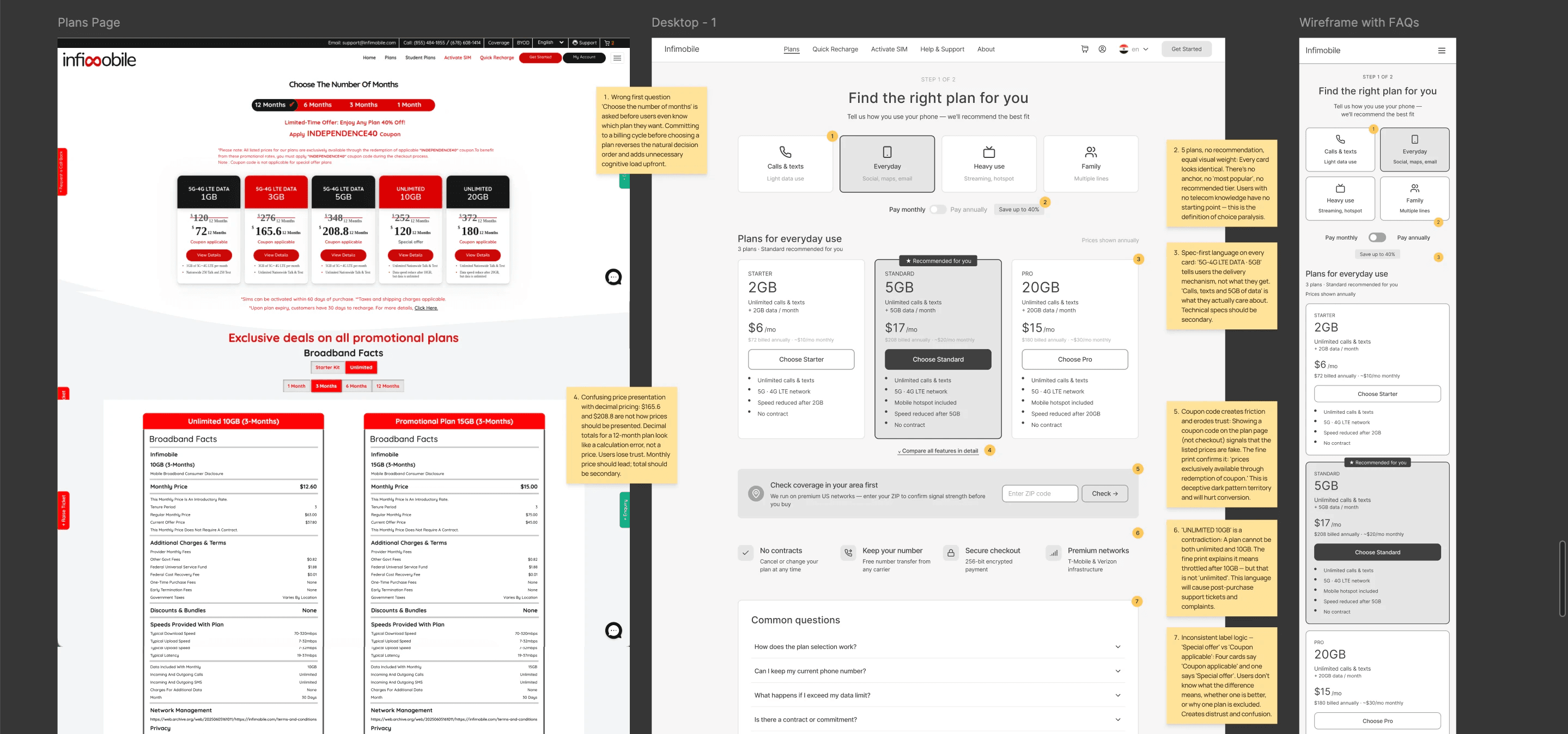
Plan Comparison
Research from the Baymard Institute on e-commerce decision-making shows that surfacing a recommended option reduces cognitive load and increases conversion, a pattern that holds strongly in plan-selection contexts.
Rather than presenting every plan with equal visual weight, each card was redesigned to lead with the user outcome ('Unlimited calls and texts + 5GB data') rather than the technical spec ('5GB LTE | Unlimited Talk & Text'), with details available on expansion.
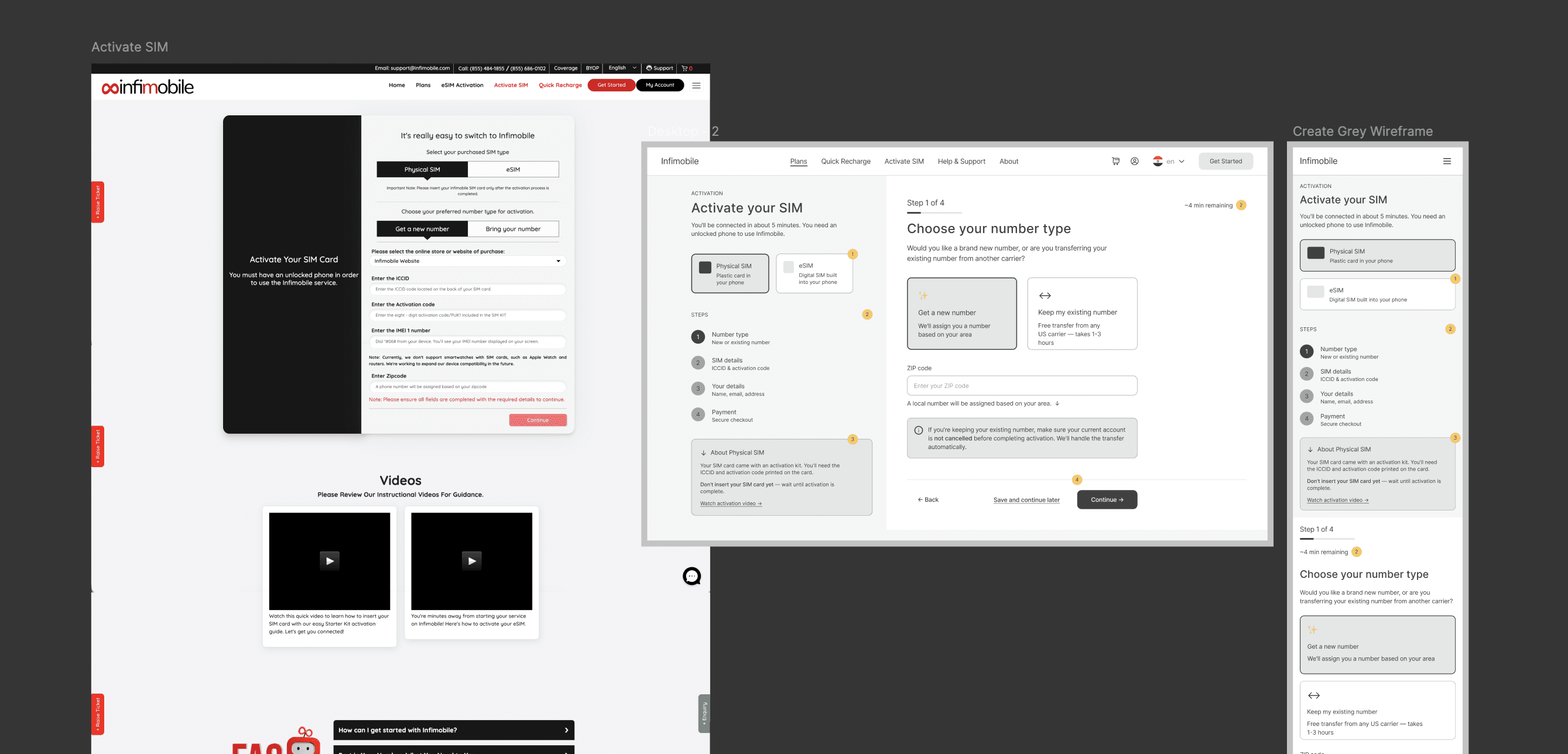
SIM Activation
The original activation flow was a single long-form page with 14 fields and no guidance. The wireframe restructured this into a 4-step wizard: SIM Type → SIM Details → Personal Details → Payment → Confirmation.
Each step included:
Contextual help tooltips explaining telecom-specific terms (ICCID, eSIM vs physical SIM)
A progress indicator showing step position and estimated time remaining
Inline error validation with plain-English correction guidance
A 'Save and continue later' option to prevent abandonment on mobile.
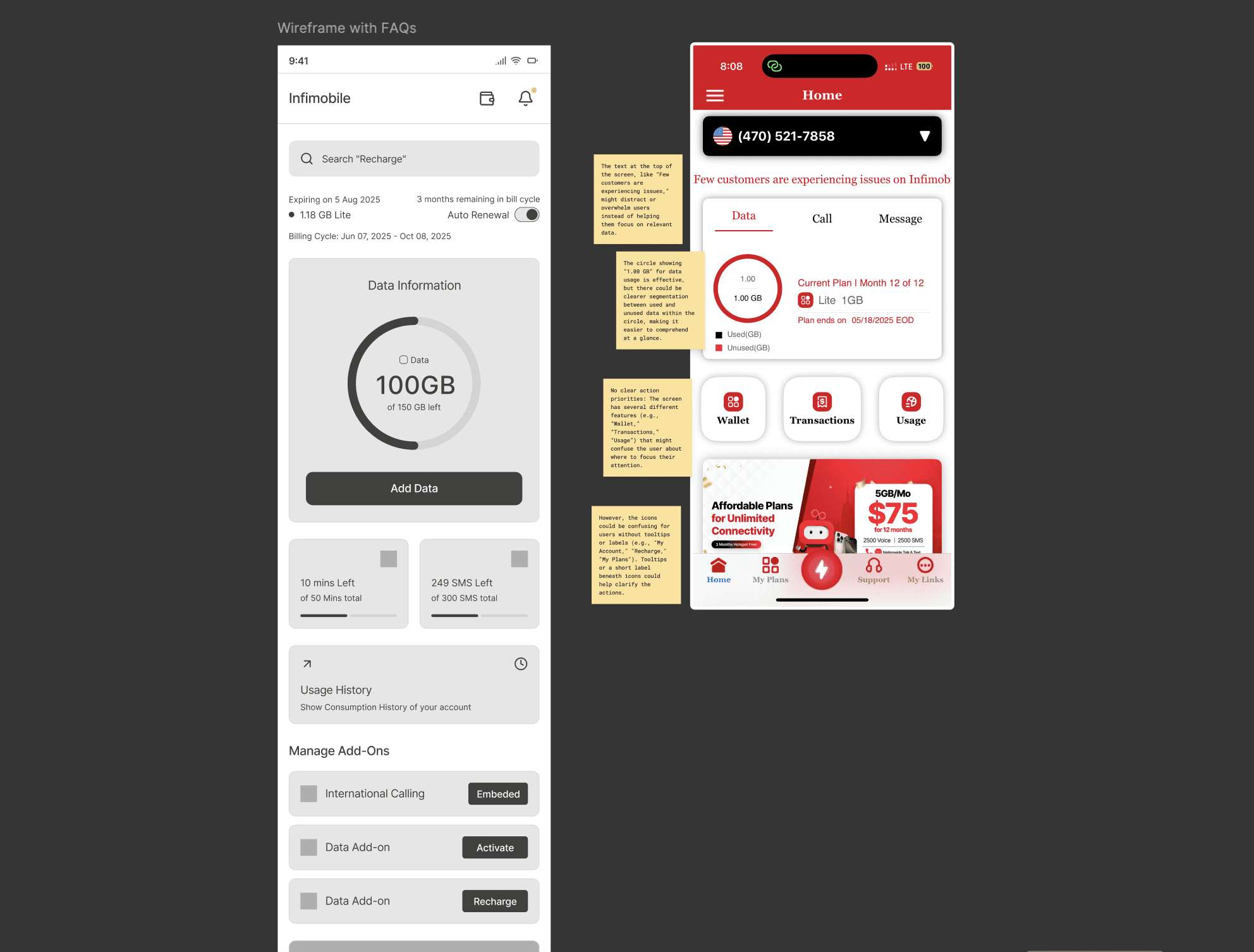
Account Dashboard
Usage-First Layout
The original dashboard surfaced account settings as the primary content. The redesigned wireframe flipped this: the first thing users see is their current usage, remaining balance, and plan renewal date. This directly addressed the finding that users couldn't easily check their data without navigating to a separate page.
Self-serve features were reorganised into a 'Manage' section below the usage view, each with plain-language labels ('Transfer my number', 'Change my plan', 'Get a receipt') rather than technical menu items.
Design doesn't end at handoff
On Infimobile, implementation support was a real part of my role. I worked directly with both developers throughout the build phase: writing detailed spec annotations for interaction states, edge cases, and responsive behaviour; running weekly design-dev syncs to catch interpretation gaps early. A few things changed in build, the 'Save and continue later' feature in SIM activation was descoped due to backend complexity, and I made those calls in collaboration with the devs rather than treating the original design as fixed.
What This Project Taught Me
Refelction
We invested heavily in research before touching the design — audits, usability tests, IA mapping. And that paid off. When it came time to make the case for real structural changes, we weren't just saying "we think this is better." We could point to exactly why.
Going back and forth between testing and revising at the wireframe stage turned out to be the smartest thing I did on this project. Problems got caught before they became expensive. Stakeholders stayed on board. And by the time we moved into visual design, all the hard questions had already been worked through.